Oracle E-Business Suite (EBS) Archival Playbook - Part 1
Foundation for Safe Oracle E-Business Suite (EBS) Decommissioning
Most Oracle E-Business Suite (EBS) retirement projects do not fail because the data cannot be exported. They fail because the archive is not usable, trusted, or ready for audit.
Architecture and data migration choices that help retire Oracle E-Business Suite (EBS) without losing historical inquiry, audit evidence, reporting access, or the business context needed after migration.
Build the Foundation Before Retiring EBS
The goal of Oracle E-Business Suite (EBS) archival is not just to move data. The goal is to make Oracle E-Business Suite (EBS) unnecessary for historical inquiry.
Part 1 defines that foundation: what history to preserve, what risks to check before migration, where the archive runs, and how the data will be validated. The companion playbooks turn those decisions into OCI build steps and DBA Data Pump steps. Part 2 moves into the user-facing archive.
Start With Archive Discovery
Archive projects fail early when the team starts with export scripts before agreeing what history must remain usable. The first step is discovery: build a clear inventory of the source Oracle E-Business Suite (EBS) landscape before the DBA sizes the target, the infrastructure team builds OCI, or the business signs off on scope. This prevents the common archive failure: moving rows while missing the modules, custom schemas, attachments, reports, or users that make the history useful later.
Capture the Oracle E-Business Suite (EBS) version, database version, database size, modules in scope, custom schemas, custom reports, attachment volume, current hosting model, and expected archive user population. Also confirm whether your organization already has an OCI tenancy or whether the archive project must include new OCI foundation work.
Discovery Checklist
Copy this table into Excel or Google Sheets before the first technical workshop.
| Area | Information to Capture | Why It Matters |
|---|---|---|
| EBS version | 11i, 12.1, 12.2, current patch level | Drives compatibility, export planning, and archive assumptions. |
| Database version | Source database release, CDB/PDB or non-CDB | Affects CPAT findings, Data Pump options, and ADW readiness. |
| Database size | Total size, schema size, growth, largest tables | Impacts export duration, transfer method, ADW sizing, and cost. |
| Modules in scope | GL, AP, AR, PO, Projects, HR, Payroll, Inventory, OM, custom modules | Defines reporting, validation, and business sign-off scope. |
| Custom schemas | XX schemas, custom tables, custom views, extensions | Prevents losing business-critical custom history. |
| Custom reports | Most-used reports, SQL logic, parameters, owners | Helps prioritize APEX reports and validation scenarios. |
| Attachments | Volume, storage model, document categories, largest files | Determines extraction, storage, download, and audit design. |
| Archive users | Approximate users, departments, roles, sensitive data groups | Drives SSO, authorization, report access, and support model. |
| Current hosting | On-premise, OCI, managed hosting, hybrid | Determines network, transfer, and retirement sequencing. |
| OCI tenancy | Existing tenancy, compartments, IAM, region, networking standards | Identifies whether OCI foundation work is required. |
Area	Information to Capture	Why It Matters
EBS version	11i, 12.1, 12.2, current patch level	Drives compatibility, export planning, and archive assumptions.
Database version	Source database release, CDB/PDB or non-CDB	Affects CPAT findings, Data Pump options, and ADW readiness.
Database size	Total size, schema size, growth, largest tables	Impacts export duration, transfer method, ADW sizing, and cost.
Modules in scope	GL, AP, AR, PO, Projects, HR, Payroll, Inventory, OM, custom modules	Defines reporting, validation, and business sign-off scope.
Custom schemas	XX schemas, custom tables, custom views, extensions	Prevents losing business-critical custom history.
Custom reports	Most-used reports, SQL logic, parameters, owners	Helps prioritize APEX reports and validation scenarios.
Attachments	Volume, storage model, document categories, largest files	Determines extraction, storage, download, and audit design.
Archive users	Approximate users, departments, roles, sensitive data groups	Drives SSO, authorization, report access, and support model.
Current hosting	On-premise, OCI, managed hosting, hybrid	Determines network, transfer, and retirement sequencing.
OCI tenancy	Existing tenancy, compartments, IAM, region, networking standards	Identifies whether OCI foundation work is required.
Find Compatibility Risk Before Design Is Locked
A migration plan looks clean until the source database exposes objects, settings, or character-set behavior that Autonomous Database handles differently. Run Oracle Cloud Premigration Advisor Tool (CPAT) before finalizing the archive migration plan so those findings become design decisions, not late import surprises.
Do not treat CPAT findings as a generic database-clone checklist. Review each finding against the agreed archive scope, reporting needs, attachments, validation, and audit evidence. Some findings require remediation; others may only need a documented archive exception.
What the CPAT review should answer
- Which findings affect archive-scope tables, views, reports, or attachments?
- Which findings are runtime-only Oracle E-Business Suite (EBS) behavior that can be documented as not required for historical inquiry?
- Which findings affect architecture, migration planning, validation, or audit evidence?
For the technical runbook, use the DBA Data Pump playbook .
Create a Secure Cloud Landing Zone for the Archive
A restored database on another server can leave the team with the same operational problem under a new name: patching, backups, monitoring, access control, scaling, and support for a system used mainly for historical inquiry. The archive needs a managed, private landing zone, not another legacy stack.
OCI is the reference architecture here because ADW, APEX, Object Storage, IAM, and private networking are native services that fit an Oracle E-Business Suite (EBS) archive pattern. The same principles can apply when enterprise cloud strategy points to Oracle Autonomous Database through Oracle's multicloud offerings in Azure or Google Cloud.
Build the foundation in a deliberate order: governance, private connectivity, storage, ADW and APEX, identity, and monitoring. That keeps dependencies visible, failures easier to isolate, and archive cost aligned to actual usage instead of daily Oracle E-Business Suite (EBS) operations.
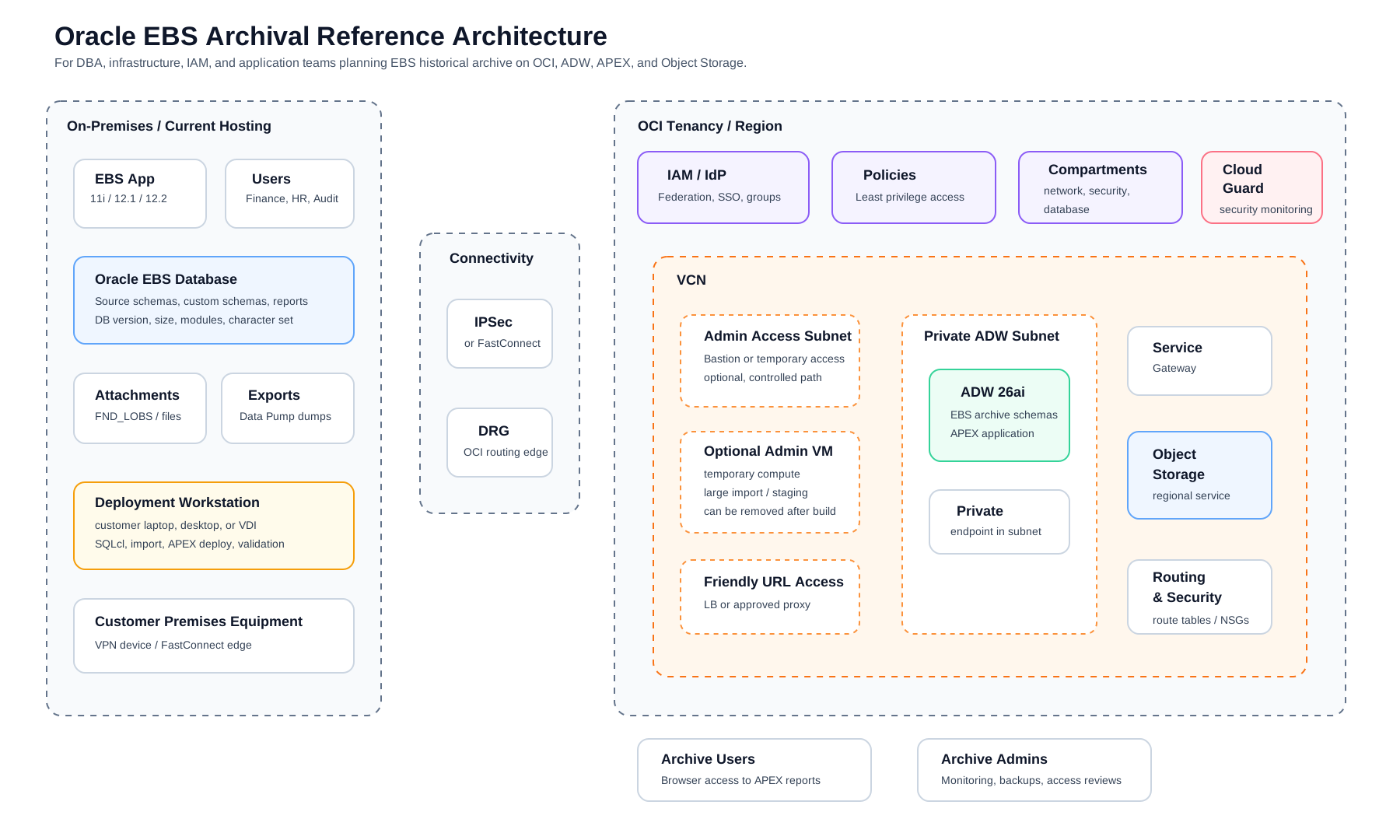
| Build Step | OCI Components | Why It Exists | Watch For |
|---|---|---|---|
| 1. Governance | Compartment, naming standard, tags | Creates a clean boundary for IAM, cost, ownership, and operations. | Do not build in the tenancy root. Agree names and tags before resources are created. |
| 2. Network And Connectivity | VCN, private subnet, DRG, VPN or FastConnect, DNS | Gives DBAs, users, and corporate systems a private path to the archive. | CIDR overlap, missing return routes, and missing private DNS are common blockers. |
| 3. Archive Storage | Object Storage, lifecycle rules, retention policy | Stores Data Pump files, extracted attachments, retained exports, and handoff evidence. | Configure encryption, retention, lifecycle, and access policies before production data is uploaded. |
| 4. Archive Database And App Layer | ADW, private endpoint, wallet, APEX | Hosts imported history, archive schemas, reporting applications, and SQL validation. | Size ADW from source data and reporting needs before the migration window. |
| 5. Identity And Access | IAM policies, SSO, NSGs, business roles | Controls who can administer the archive and which users can see each module. | Avoid broad tenancy policies, open CIDRs, and full-archive access for all users. |
| 6. Monitoring And Operations | Cloud Guard, logs, alerts, response ownership | Keeps risky configuration, public exposure, and access drift visible after go-live. | Confirm who reviews findings and how the archive is supported after handoff. |
Reference build playbook
Use the companion OCI build playbook when the infrastructure team is ready to implement the reference architecture. It includes a manual console path, a Terraform path, input tables, failure checks, and connectivity validation steps.
Open OCI build playbookProve the Archive Can Be Trusted
A Data Pump import can finish successfully and still leave the archive hard to trust. The team must be able to explain which Oracle E-Business Suite (EBS) schemas moved, which objects failed, which objects were excluded, and how the target reconciles to the source.
Use CPAT findings, import logs, row counts, report comparisons, attachment checks, and business sign-off to separate real remediation from documented archive exceptions. The target ADW database does not need to be an identical clone; it needs to be complete for archive use, explainable for audit, and useful for reporting.
Keep the original source export according to retention policy, and preferably long enough to support future migration of excluded or non-EBS-related data if the business later decides it is needed.
Data Pump export and import playbook for archive DBAs
Use the companion DBA playbook for source sizing, export filesystem setup, Oracle directory DDL, metadata export, data export, Object Storage upload, and archive handoff checks.
Open Data Pump playbookFrom Foundation to Usable Archive
Finance, HR, Supply Chain, Procurement, Audit, and IT do not need another schema to query; they need a secure way to find old transactions, run familiar reports, open attachments, and prove the numbers when questions come later.
Start with the reports those teams ask for most often, and validate them before Oracle E-Business Suite (EBS) is retired. Oracle APEX gives the archive room to grow: interactive reports can be built with SQL, and preserved EBS metadata helps experienced analysts and DBAs extend the reporting layer when new audit or business questions come up.
That is the next layer of the archive: Oracle APEX reports, module-based navigation, attachment access, SSO authentication, authorization by business role, friendly URLs, and a support model that does not depend on keeping Oracle E-Business Suite (EBS) alive.
Part 2 moves from foundation to usability after Oracle E-Business Suite (EBS) is retired.